Free
Lithophane Maker
Upload a photo and download a print that shows the picture when a light shines through it.
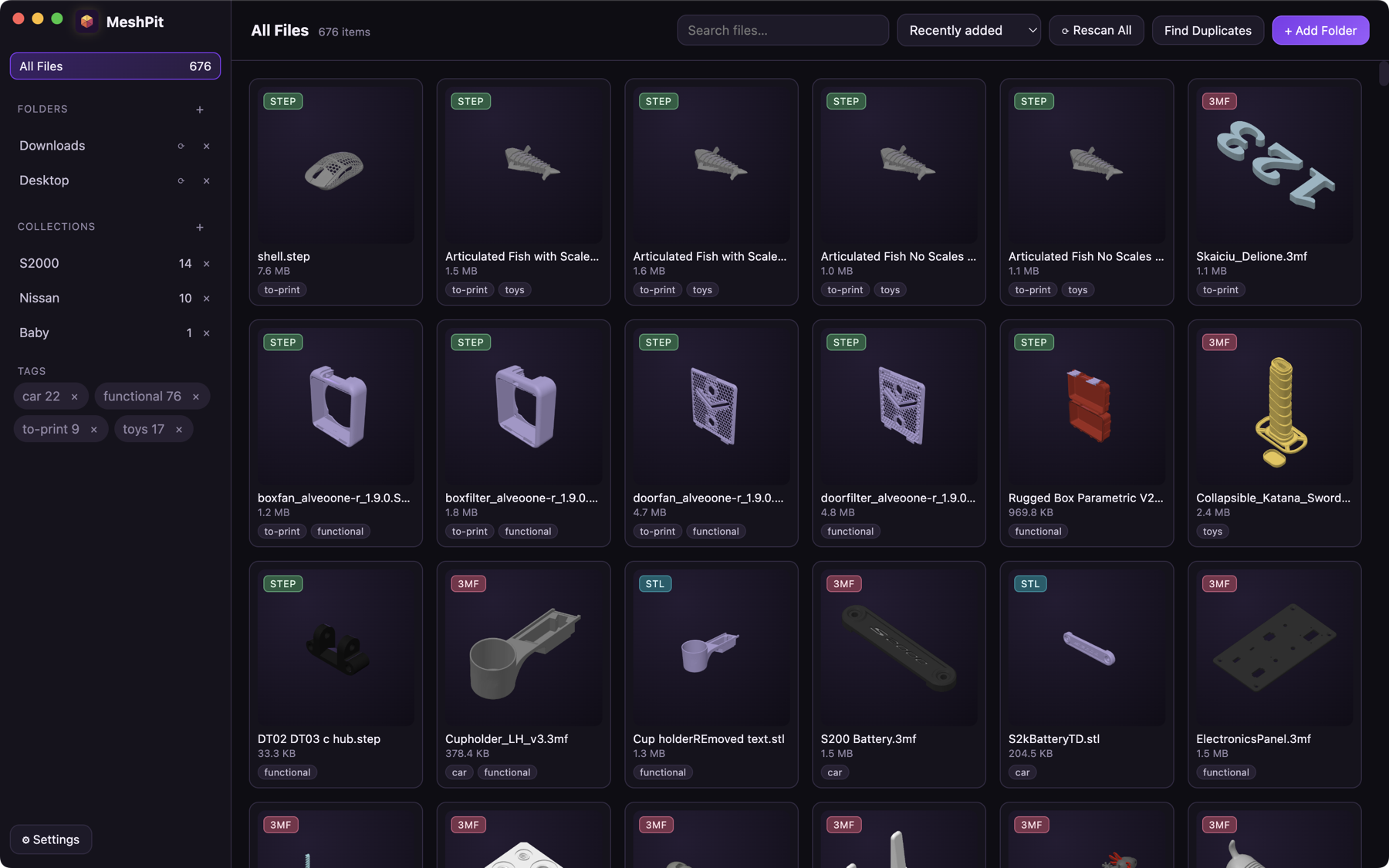
Make a lithophaneMeshPit Desktop is a free STL organiser. Point it at your download folders and it shows a thumbnail of every STL, OBJ, 3MF and STEP file. Your files stay where they are. The app and every tool in it are free, with nothing to buy.
Open a model you got from Printables or Thingiverse, click the face you want to change, and download the new file.
Free online, no account needed · also in MeshPit Desktop
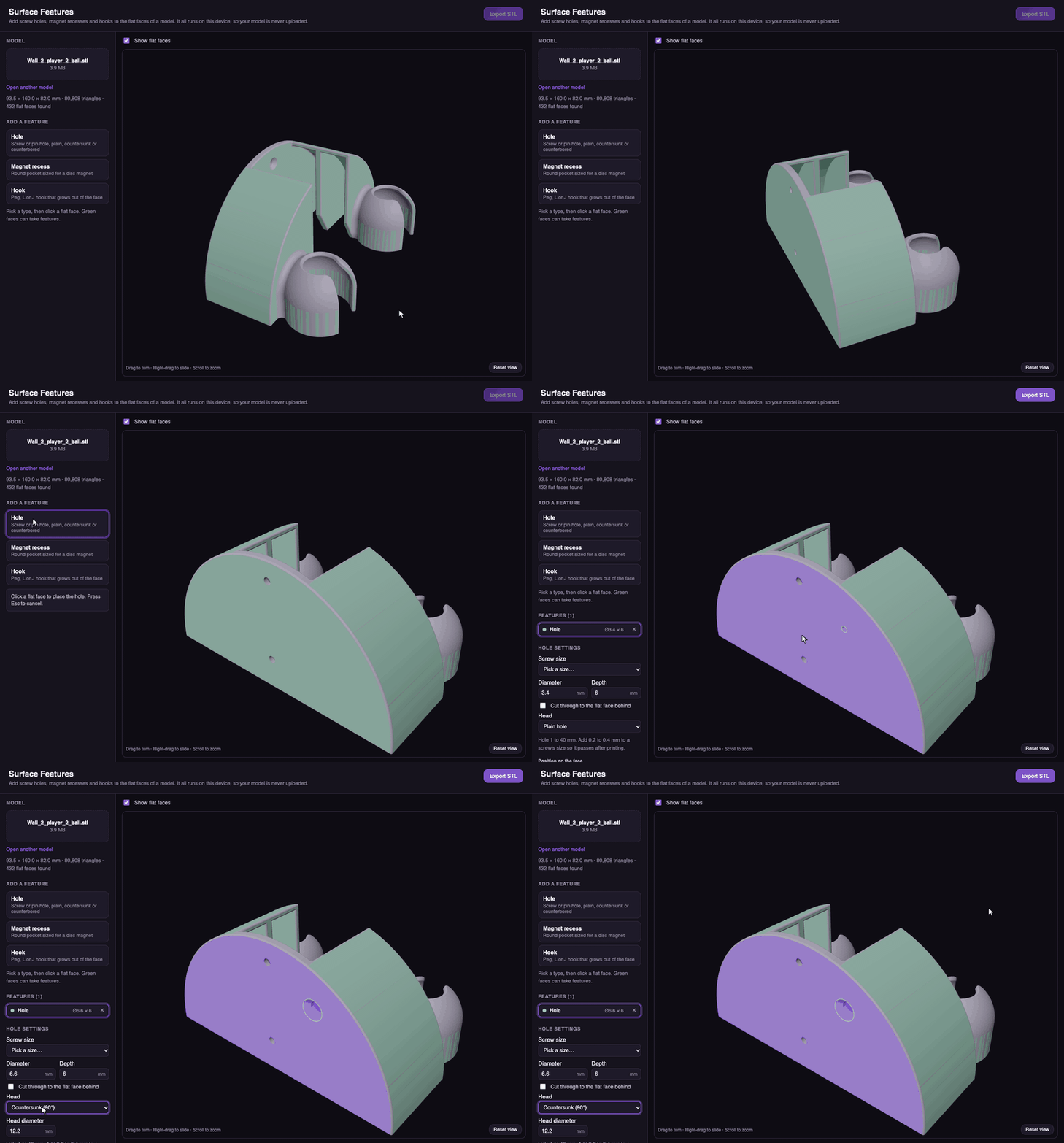
Drop in the STL, OBJ or 3MF you downloaded.
Choose Hole and click any flat or curved face. Pick a screw size from the list.
You get an STL back, or your 3MF with that part changed, ready for the slicer.
Open the file and Mesh Repair closes its holes, fixes non-manifold edges and turns inside-out triangles the right way round. Save the fixed STL or OBJ. The file stays on your computer.
Upload a photo and download a print that shows the picture when a light shines through it.
Make a lithophaneType a name and get the parts for a sign that glows with an LED strip inside.
Make a light boxAdd a name to your own SVG or a built-in picture, and it goes on stakes for the cake.
Make a cake topperType the size, drag USB ports and switches onto the sides, and get a case for your electronics.
Design a boxSet the pipe size and the angles, and get a hub that joins poles for a tent or a frame.
Make a connectorTurn a logo or a drawing into an SVG in one colour or several.
Convert a PNGSurface Features, the Project Box Designer, Mesh Repair, the Lithophane, Light Box and Cake Topper Makers, Pipe Connectors and PNG to SVG. Your files are built in your browser. Download as many as you like.
The model library with no limit on models, projects, and every tool on your computer, offline. Nothing to buy and no account.
Yes. Open the STL in Surface Features, choose Hole, click a face and pick a screw size. The preview shows the hole straight away, and Export STL gives you the model with the hole cut in. Magnet recesses and hooks work the same way.
Open it in MeshPit Mesh Repair. It checks the model for holes, non-manifold edges and vertices, flipped normals, duplicate and degenerate triangles and self-intersections, fixes them and saves a new STL or OBJ. The repair runs in your browser, so the file is never uploaded and you don't need an account.
Install MeshPit Desktop, which is free on macOS, Windows and Linux, and point it at the folders where your models live. It renders a thumbnail of every STL, OBJ, 3MF and STEP file without moving or copying anything. Then you can search by name as you type, sort models into collections, and find byte-for-byte duplicates.
Every MeshPit tool that makes a model exports STL, which Bambu Studio, PrusaSlicer, OrcaSlicer, Cura and other slicers open. The Light Box Maker and Cake Topper Maker also export a multi-colour 3MF for Bambu Studio and OrcaSlicer, and Mesh Repair also saves OBJ. The desktop library shows previews of STL, OBJ, 3MF and STEP files, including the plate preview that Bambu Studio, OrcaSlicer and PrusaSlicer save inside a 3MF, and a double-click opens a model in your slicer.
Yes, all of it, and there is nothing to buy. Every MeshPit tool on the website is free, with no account needed and no limit on how much you use it. MeshPit Desktop is free too, with no limit on the models in its library, and it includes projects and every tool. Sign in on the website only to save designs to My projects.
Yes. When you post a file you made with a MeshPit tool on MakerWorld, Printables, Thingiverse, Creality Cloud or another site, add a line such as "Made with MeshPit (https://www.meshpit.co.za)" to its description.
 MeshPit
 Desktop is free on macOS, Windows and Linux.